Thursday, October 18, 2012

HTC J Butterfly: The Phablet Trend Continues...

HTC J Butterfly

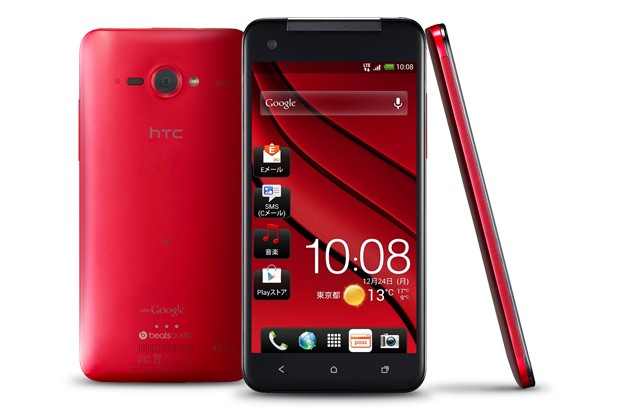
HTC has recently unveiled a new phone, the HTC J Butterfly geared towards the "phablet" crowd. With Android 4.1 Jelly Bean onboard, the HTC J Butterfly is running the newest software at the time of release. Of course, with version 4.2 looming, there are no guarantees as to when the next software update could be available. Like any other HTC device, the HTC J Butterfly has a Sense overlay.

The screen of the HTC J Butterfly is nothing short of spectacular. It features a 1080p display on a 5 inch Super LCD 2 screen. Inside the device is a 1.5Ghz Quad Core Snapdragon S4 Pro processor and 2GB of RAM. There is 16GB of onboard storage available, with a microSD card slot.  On the back of the phone is an 8-megapixel camera with a f/2.0 lens and on the front is a 2 megapixel front facing camera. Powering this device is a 2,020mAh battery.

Compared to the Galaxy Note II, the J Butterfly lacks the massive battery that the Note II has. This gives us the question, is a 2,020mAh battery enough to power the 5-inch device throughout the day? The screen is wonderful, and I am sure it will attract much of the phablet crowd, but how many?

Monday, October 1, 2012

Patience for updates growing slimmer and slimmer

Source: Mobile Devices phone

How long are you willing to wait for the next version to upgrade? One month? Six months? A whole year? Android updates, as widely known as they are, take forever to update. Some phones don't even get a single update! My HTC Wildfire S, for example, has never received an update. It has been stuck on version 2.3.3 Gingerbread since I got the phone, and looking towards the future, does not seem likely to receive an update anytime soon. So what were my options? Either stick to Gingerbread, or go through the process of rooting, and install a custom ROM. I opted for the latter, but I do wish that I could have gotten an update from HTC themselves.

Even though the Wildfire S is a seemingly low-end device, there may be some justifications as to why it did not receive an update. The amount of RAM available, and the devices' internal memory is just not sufficient enough to run Ice Cream Sandwich, let alone Jelly Bean. But what about devices that have enough memory and RAM to support the next and newest update? Some are being left to dry alone, like the Motorola Atrix 4G. The Atrix 4G has 16GB of internal storage, and 1GB of RAM. It even has a dual-core 1Ghz processor. In what means is this not capable of running Ice Cream Sandwich? It is more than capable, and better specifications than the Nexus S, currently running Jelly Bean.

Jelly Bean, released back in July of 2012, is currently only running on the Galaxy Nexus and the Nexus S for Android phones. Now, September of 2012, updates are slowly rolling out to users with a Galaxy S3 in Poland, getting the long awaited Jelly Bean update. Two months seem like a long time, but do you think it's worth the two month rate? Do you think it could roll out quicker?

What's really at the root of this problem? Is it the skins that are running atop of stock Android? Is it missing the hardware acceleration? This problem has plagued Android, and many users are flocking to alternatives, such as the less cumbersome iPhone or Windows Phone options. Both of these devices are capable to update once the update has been pushed out. There is a minimal amount of wait, you are guaranteed an update at least once a year, until you are unsupported.

What is your opinion on this issue? How long are you willing to wait for an update?


Tuesday, September 25, 2012

Choosing a Phone that is Right for YOU

Source: Gizmodo

In this day and age, many flock to the Internet to find out more on their future cell phone. What makes it difficult now, is the amount of "fanboys" and "fangirls" lurking around. They each claim that a certain platform is better than the other, without giving a fair credit to the other platform. How must we choose with so many variables?

Scroll to any iPhone 5 Review post, and you will see in the comments that "iPhone sucks" or "get an S3 instead." This information does not help you in any way, and often makes you even more confused. Why would someone say that? Am I missing something in my research? The point is, that many try to sway you to one side, and persuade you into getting a phone that may not be right for your needs. This isn't right, so how shall we pick our phones without sucking into peer pressure?

My opinion is to check out more than one review. Know the pros and cons to the phone, and visit different sites for different opinions. Try to find a balance between the reviews, as some may be biased. If one review says that "the screen is inadequate," and others believe "the screen is beautiful," find the balance. Take note into what most people say, and ignore the outliers. Go into the research with a clear mind, and lots of time. Write down a list of things that you require the most, for example, battery life, or LTE connectivity. Find matches based on what you need, and then go further into which operating system you would like to use. Take your time. Technology moves at a rapid pace, but it can only go as fast as you want it to go. Remember that you will be using your phone for at least two years, so choose the right one for you.

However, most importantly, you must try out the phone before you purchase the device. Play with the phone in store for as long as you want. If the retailer pushes you to another phone, try it, but don't be too swayed to  what they want you to get. Try to go to a retailer that does not work based on commission, as they will be more honest to you. Don't be afraid to ask questions, the more you ask, the more you will know about the phone.

Different phones are right for different people, and no two phones work the same way. Don't suck into peer pressure and get what your friends get. It's okay to be different and unique. So what if you don't have iMessage or BBM? You can always text each other. Find your perfect phone, and keep using it, until you find the next perfect phone that is just right for you.
Sunday, September 23, 2012

Maluuba: First Impressions


Maluuba, a Google Now type app, offers a very simple and clean look. This look is extremely similar to Windows Phone 8, offering tiles, and swiping left and right to go between "folders." Maluuba offers more than Google Now, giving you restaurants, movies, businesses, and more.

"My day" offers you a simple agenda layout on your appointments and meetings of the day. If you do not have anything scheduled for a day, a similar layout pops out with suggestions for movies, or businesses.


Weather is laid out very cleanly, information popping out at you quickly. However, I could not find the option to change from Fahrenheit to Celsius, one that is useful for me daily.

Movies are shown quickly, with listings that are now playing, and opening soon, Clicking on an individual movie will give you information about the movie, such as the genre, director, cast, and the ability to view the trailer. You are also given the option to share the movie by email, Twitter, Facebook and SMS.


Now for the voice search. Answers are given in three sections: answers, wikipedia, and more sources. The answers category is powered by Wolfram Alpha, giving a list, general information, and an image. Information is laid out very nicely, and it does a nice job of recognizing what you say.

Maluuba is quite impressive, and although I have access to Google Now, I may be using it in conjunction with it. This app simply brings more to the table, more information, with a clean and easy to use layout. This app will be staying on my phone.

Give it a try! Download now here!!

Saturday, September 22, 2012

Is jailbreaking or rooting really necessary?

Source: HowToGeek
Jailbreaking for iPhones and rooting for Androids are words commonly thrown around, but how many actually know what these two words mean?

Jailbreaking refers to changing things in iOS products that generally could not be changed. For example, jailbreaking gives you access to Cydia, an "app store" for themes, apps, settings, and much more. With a jailbroken device, you are able to change the icons of each app, the keyboard colours, and lock screen settings. From what I have experienced, a jailbroken device is much more unstable, and may lead to lag, crashing and unexpected errors. It has gotten so bad that I restored my device back to factory device settings.

Rooting refers to unlocking the bootloader, and have full control over the device. With a rooted phone, one is able to install a new ROM, change notification icons, and can almost change anything imaginable. Popular ROMS, such as CyanogenMod, is available for many devices. Those that have a skinned device are now able to have stock Android. Another plus for rooting your phone is that you are able to "update" your phone before your carriers release them. For example, a developer may decide to port a ROM to your device, and have it based on Android 4.1. Not only can you change the ROM, you can make your speakers act differently, such as installing Beats Audio. There may also be speed improvements, as scripts such as the V6 SuperCharger. Similar to jailbreaking, you can also restore back to factory default settings, and wipe the number of ROM installs on the device.

Is this really necessary? For the average user, rooting and jailbreaking is not necessary for the phone to function. Advanced users, users that enjoy tinkering with settings will enjoy the freedom to add things they aren't allowed to. The user freedom is something that many will enjoy, and rooting and jailbreaking may fulfill that joy.

Note: I am not promoting jailbreaking or rooting. Please note that jailbreaking or rooting WILL void your warranty. 

Friday, September 21, 2012

Google associated Apps on iOS now obsolete

Source: MacRumors
In the recent iOS6 update, Apple has controversially decided to get rid of YouTube and Google Maps as applications pre-loaded on devices. To get YouTube, one must download it off the App store. No warning, nothing. The uninformed about the update may just go ahead with the update, and not realize that YouTube will no longer be pre-installed. Small task, but many rely on YouTube as there is no Flash support in iOS. Google Maps on the other hand cannot be reinstalled in any way after updating to iOS6. Your only option is to use Apple Maps, or wait for Google Maps to come to the App Store.

Apple Maps created uproar on the Internet because of its' many inaccuracies. Bridges somehow melting, highways suddenly sloping upwards at 90 degrees, and incorrect placings of landmarks shows that it is nowhere near Google Maps league. Although this iOS6 update brings you turn-by-turn navigation, it still does not match up to the standards of Google Maps.

I understand that Google Maps has been out for a long time, and has gone through these phases as well. Misprints, and little errors plague every software, but landmarks such as the Statue of Liberty are not well represented in Apple's Maps. A popular landmark, known to almost everyone in the world, is hardly seen in Apple's maps. To me, this does not seem to be an application up to Apple's standards. Apple's motto, "It just works," no longer applies to this specific application. It just doesn't work the way you want it to. There is no transit map available, with only a button leading you to a third party app. Buildings are misrepresented, and there is no option to downgrade back to Google's Maps.

So what does this mean for Google? Google now has a viable edge to this game. Pushing out their own application to the App Store could gain much of their traffic back. Could this mean that Apple users are in frustration, and turning to other operating systems in the future? Certainly possible, but I highly doubt it.

Apple has also released a statement about the app, stating that "this is just the beginning...improvements to come." We'll just have to wait and see.

What do you think about Apple's decision to steer away from Google? Do you think they will be successful in the future with this plan? Let me know!

Thursday, September 20, 2012

HTC 8X and HTC 8S

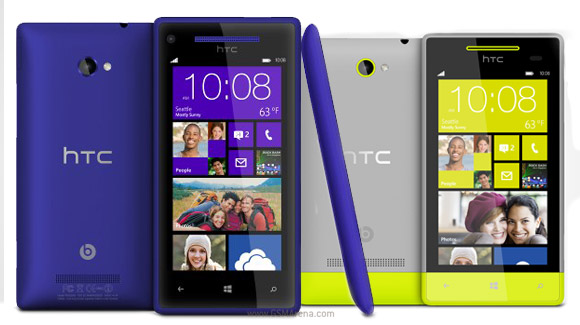
Another day, another...wait Windows Phone 8 device? That's right, two new Windows Phone 8 devices were unveiled in New York today by HTC. Sporting bright new colours, this seems to be the new style of Windows Phone 8 devices.

HTC 8X on the left, and HTC 8S on the right
WINDOWS PHONE 8X:

Looks like a Lumia, eh? The HTC 8X is the flagship of HTC's Windows Phone line and comes in blue, white, yellow and red. Similar to HTC Android phones, it comes with Beats Audio.

Inside the hood: Inside the 8X is a dual core Snapdragon S4 processor clocked at 1.5Ghz and a 1GB RAM. 16GB's of internal storage is included, with an option to have expandable storage via microSD cards of up to 32GB. An 1800mAh battery is included, enough for you to go through the day. The battery is non-removable. 

Outside the hood: The 8X has a 4.3" Super LCD 2 display with a pixel arrangement of 1280 x 720. The back camera is 8 megapixels and records at 1080p. The front-facing camera is 2.1 megapixels and also can record at 1080p.

WINDOWS PHONE 8S:

The 8S is the lower-end one of these two devices, but it is not lacking on the specification front.

Inside the hood: Inside the 8S is a single core Snapdragon S4 processor clocked at 1Ghz with 512MB of RAM. It comes with 4GB of memory, and can be expanded via microSD card of up to 32GB. A 1700mAh battery is included, but is non-removable.

Outside the hood: The 8S has a 4" Super LCD  display with a 800 x 480 resolution giving it 233ppi. The back camera is 5 megapixels capturing video at 720p. There is no front-facing camera on this device. 

Does this change your view on Windows Phone 8? If you had the choice, would you choose the 8X/8S/Lumia 820/Lumia 920?